
Food Retail Monitoring for CO₂ Systems
E3 Supervisory Controller is a refrigerant agnostic supervisory control platform for supermarkets and other food retail facilities, compatible with CO₂ systems.
Scroll to explore capabilities.

Copeland Supervisory Control Platform
For supermarkets and other food retail facilities, the Copeland E3 supervisory controller helps bring critical systems together through one streamlined platform. Explore E3 hardware, Site Supervisor hardware, controller navigation, alarm configuration and other key functions that help simplify facility management and support more efficient operations.
Access the brochure to make facility management easier, faster and more efficient.

Case Study: Modern Controls Reduce Costs and Downtime for Remote Food Bank
Helping a food bank improve visibility and reliability, a donated control system equipped with the Copeland E3 supervisory controller was used to monitor and maintain walk in cooler and freezer systems. The result was improved performance, reduced downtime and more dependable day to day operation.
Access the case study to see how improved visibility and reliability help reduce downtime and improve day-to-day refrigeration performance.
Smarter Facility Control Starts with E3
Discover how E3 Supervisory Control brings your facility and refrigeration systems together into one intelligent, easy-to-manage platform. In this short video, see how real-time visibility, on-site and remote access and powerful system integration help you streamline operations, respond faster and drive better performance across your store.
Watch now to see how E3 simplifies control and unlocks smarter facility management.

Seven Proven Technician Benefits of Upgrading to the E3 Supervisory Control
See how service technicians and contractors are simplifying installation, programming and system management with the E3 supervisory control platform. Discover the top benefits of upgrading from the E2 controller and hear real-world insights from industry experts.
FAQs
Does the E3 supervisory control for CO₂ applications provide visibility in the iPro high pressure controller?
Watch this quick explainer.
What unique features and capabilities are available in the E3 supervisory control for CO₂ applications?
Find out in this short video.
How does the E3 controller simplify CO₂ refrigeration?
Watch it all come together.
What setpoint conversion tools and services are available for the E3 controller?
Learn more in this short video.
Take your operational standards to the next level
- TRUE DROP-IN REPLACEMENT
- VISUAL STORE MANAGEMENT
- ROBUST CONTROL CAPABILITIES
- SIMPLIFIED DEVICE MANAGEMENT
- QUICK RESPONSE TIME
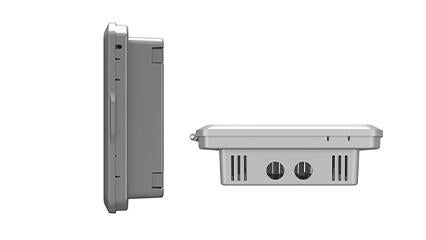
True drop-in replacement
With the same form, fit and wiring that is designed to fit into your existing E2 panels, the new E3 provides a true drop-in replacement for simplified installation.
With new advanced features and an affordable price point, it's never been easier to upgrade your supervisory controller.

Visual store management
Gain instant visibility to all key systems in your store and quickly identify problem areas. The E3 includes floor plan views, graphic status indicators and smart alarms.
Its intuitive, icon-based navigation allows all users to immediately leverage the platform's comprehensive supervisory control capabilities.

Robust control capabilities
Take control of all critical systems with greatly expanded refrigeration control strategies, suction control algorithms, building controls and network connectivity.
The E3 allows you to act quickly, providing detailed information of possible causes and actions needed for resolution.

Simplified device management
Back up, restore and update firmware, install or remove files and access the list of applications from one location.
The E3’s intuitive navigation and responsive, web-based design provides easy access and a familiar user experience from any device.

Quick response time
The E3 also features processing power 12 times faster than the E2 and includes 16 times the built-in memory for improved response time.
Professional services: Receive support from start to finish
Get the most from your HVAC/R controls before, during, and after installation with Copeland Professional Services. We're here to help you simplify processes, reduce frustrations, and improve results. Learn more about our Professional Services or contact us today to get started.
Speak to an Expert
Ready to upgrade to an E3 or have questions? Contact us today to speak with an expert and explore your options.